Category Archives: Software

Progressively More Disturbing Contextual Search Results


I was recently searching to see if there’s a standard/ideal way to catch the “potentially dangerous input” exceptions that ASP.NET likes to throw if there’s anything that looks like script injection in the request.

Note: these did not come up in my Google results, but in a page hosting a generally useless forum discussion.

OK, this one is kind of funny. I’ve never watched the show, but I hear that it’s pretty good. I live in Ballard and drive by the signs for the boat tour all the time. I was trying to catch “potentially dangerous” exceptions, and not “deadly” ones, however. 


Ignoring for the moment that our culture is already awash in meaningless catch phrases and we shouldn’t encourage people to use more of them, aren’t catch phrases free? If they somehow weren’t free, wouldn’t you be better making up your own?


This third one is the most disturbing. Using GPS to track someone you suspect of cheating on you? Added bonus: having an active GPS installed on someone’s car would come in handy for the post-breakup stalking phase. Here’s some free advice to anyone looking into this solution: if your relationship is so bad that you feel a need to track their every move, it’s best to move on. If you need evidence, hire a private detective, because at least that’s kind of cool.

Alas, I didn’t find anything useful with the specific problem I was searching for. I’m just turning off the request validation and dealing with the potentially dangerous stuff manually.

Another 25 employees? No thank you.

I recently read an outrageous claim from a company that makes software project management tools. I’m leaving the company name out of this post as I don’t want to either single them out, or to give them publicity.

[Product X] companies were 25% more productive.  That’s like adding 25 people to a 100-person department, free!

Let’s just set aside the notion that you can accurately measure productivity of software teams in a meaningful way (you can’t). My immediate thought take on that was, “No, it’s like removing 25 people from a 100-person department. Hasn’t anyone read the Mythical Man-Month?”

Automated Test Distinctions: The Food Pyramid

This is something I came up with a while ago when I was working on a large integration/orchestration project for a now-defunct MVNO (mobile virtual network operator). It was a pretty complex project, which had many external collaborators and end-points into the system. The project was having some issues with being able to reliably deliver incremental functionality on time. I had a directive to use my judgment to essentially turn the project around.

I had just come off a project which had excellent pure unit test coverage, but not very good overall test coverage with actual collaborators. The integration points were much more difficult and painful than they needed to be. On the other extreme, I inherited a bunch of existing non-unit tests as part of the MVNO project. These were brittle, took a long-time to run, and failed for a bunch of different reasons. As a result, they weren’t run very often, became neglected, and eventually worthless.  There was no continuous integration in place, so the feedback loop between breaking something and finding what you broke was very loose.

To make matters just a little more dicey, I was working with another test-focused developer who had a strong preference for writing epic end-to-end tests, while I was trying to make the code more able to be tested in isolation. I resented the fact that “his” tests were keeping me from running the tests as part of the cruise control build.

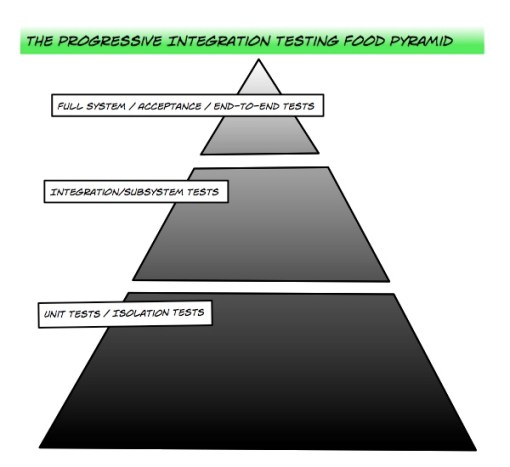
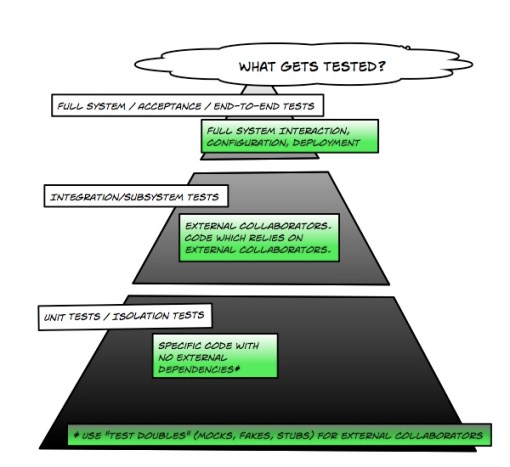
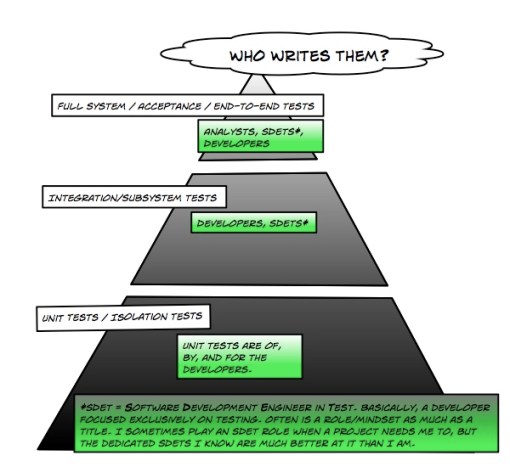
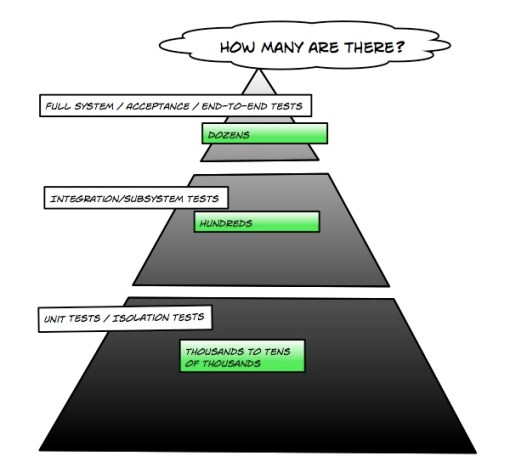
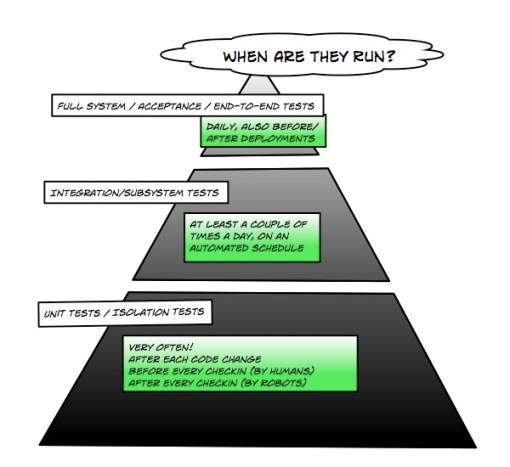
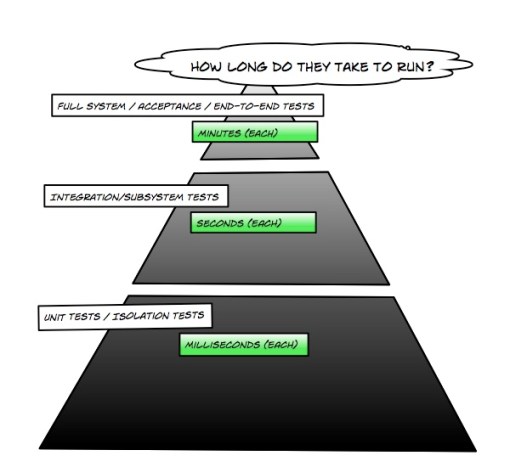
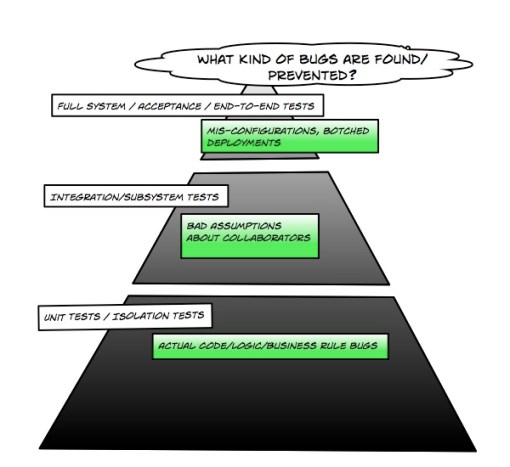
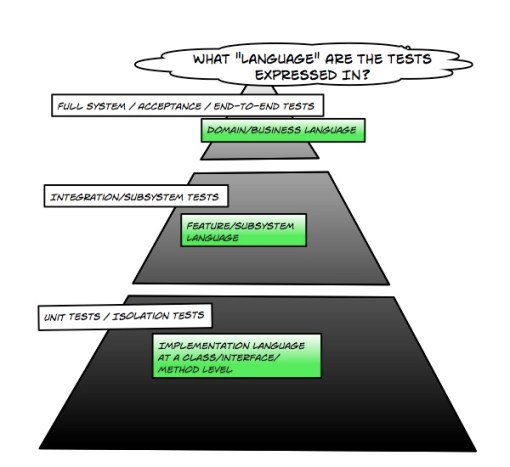
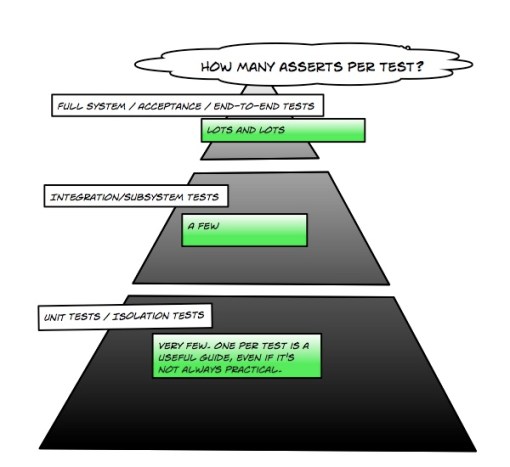
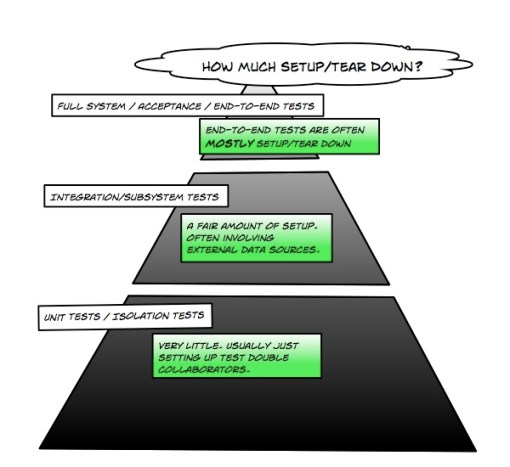
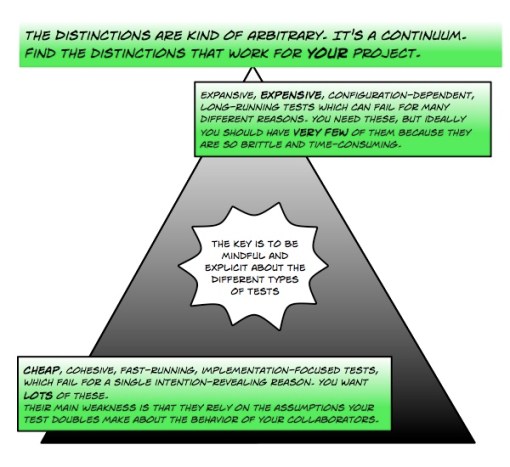
I came up with what I called the “Food Pyramid” as a way of balancing these different forces and points of view. I broke the one massive test project into three distinct assemblies with their own goals.  The differences between the projects are best explained in a series of pictures:

So, did it work? Yes and no. We eventually had much smoother and more confident deployments thanks to the end-to-end tests. I also managed to refactor and add new code more quickly with fewer bugs thanks to my unit-test safety net. But, just as I was starting to get a handle on the project, the client filed for bankruptcy and stopped paying their vendors (which unfortunately included me). It seems that having a viable business model trumps all.

I have, however, used these and similar distinctions successfully on subsequent projects, and I know that at least one development organization I’ve explained the idea to has adopted the pyramid as part of their overall testing strategy.

Not Sure the World Needs Another Named Prescriptive Methodology

This, on the very same day that some tries to create a definitive list of methodologies, Net Objectives (the one-time sister company and training provider for the company I contract through) has just announced their new flavor/version/whatever of Scrum, which they are calling Scrum# (pronounced “sharp”, like C-sharp). It is (as far as I can tell) essentially Scrum + Lean Thinking + Emergent Design + Focus on scalability. Many things that a lot of us are doing already.

To be fair, the approach they are taking is exactly the one that I would advocate, focusing on and being mindful of the principles/values of what works and what doesn’t work. I’m just not sure I can get behind the name.

Is Clearwire right for you? Take this simple quiz!

Alas, the curse of the early adopter.  I was really excited to switch to Clearwire, especailly after my beloved ISP for many years, Seattle’s own Speakeasy Networks was purchased by Best Buy. I’m not exactly a Best Buy fan.

I should have done some more research before signing up, though. It turns out that Clearwire is actually not for everyone, and the things they don’t support well are not really called out in the terms of service. To help future consumers, I’ve put together a simple guide:


Clearwire is not for you if you’re a pirate.

Intellectual property pirate, that is. I think that the company has no problem with peg legs and eye patches. Reading some reviews online, I found that ClearWire openly and aggressively throttles traffic from P2P apps such as BitTorrent. No big deal, I almost never use BitTorrent, and I never ever pirate movies, software, or music. 


Clearwire is not for you if you want to watch perfectly legal web video.

Sure, BitTorrent is used largely for piracy and/or pornography, sure the copyright status of YouTube videos is often dicey, but what about Hulu? Hulu is the Republican National Committee of web video, as square, legal, and business-friendly as it gets.  Hulu also provides some of the most conclusive proof that My connection is throttled, as I can reliably watch the first half of an hour-long drama no problem, but the second half is unbearably slow.  Letting me watch the first half of a really engaging show like House but not the second is just mean-spirited.  Now I’ll never know if it was Lupus, Vasculitis, or Paraneoplastic syndrome!


Clearwire is not for you if you want to listen to internet radio.

OK, maybe streaming video is too much to ask for even if the video bitrate is well within the download bitrate I’m paying for. How about streaming audio? Well, if I’ve been doing anything network-intensive in the last few hours, the live audio stream from my favorite NPR station to my Chumby stops working.  


Clearwire is not for you if you’re a digital photographer.

Every time I try to upload more than a dozen or so pictures to Flickr via the Uploadr, I hit whatever mysterious upload cap there is and the last of them just completely fail with the “Houston, we have a problem” error message. Just like with Hulu, it works fine for a little while before some opaque limit is hit and then it grinds to a halt. How important is this really? It’s not like very many people actually use Flickr.


Clearwire is not for you if you need to work from home.

After several years of working from home exclusively, I try not to work from home any more than I need to, but when I need to make a  VPN/Remote Desktop connection to my PC at work, it works out pretty poorly. I know the problem isn’t with my company’s network connection, as when I do VPN/Remote Desktop from a coffeeshop with Wi-fi, it’s like I’m at my desk. Maybe this is meant as some sort of feature? Helping me improve my work-life balance? 


Clearwire is not for you if you’re a Linux user.

As linux users tend to be power users who not only download huge ISOs, but also download ISOs using the infamous BitTorrent network. Fortunately, for me, I haven’t been a Linux user for some time.


Clearwire is not for you if you’re a Mac user.

This was particularly painful. The first day with a gorgeous new iMac, some software I wanted to run required a large OS X update… which by the end of the download, was coming down at sub-dialup speeds. 


Clearwire is not for you if you’re a Microsoft Windows user.

Even more painful and disruptive to download than the OS X updates are the frequent, vital, and huge updates that Windows XP needs.


Ouch. That has turned out to be a very negative summary above, and I usually try to be a positive person. So, who would Clearwire be ideal for? Here are some groups of people that I can think of for whom Clearwire would work well enough:

  • The last holdouts of the gopher protocol, those who are convinced that this whole web/multimedia business is just a passing fad. 
  • People who want high-speed internet but don’t actually have any computers or network devices.
  • Dead people.

Agreement on the Lean-Agile Connection

I’ve been arguing (mostly unsuccessfully) for some time that Lean Software Development and Agile are two different intellectual frameworks for understanding the same underlying concepts. The artificial distinctions that people draw are often based on connotations of the words themselves, such as “agile is about fast while lean is about cheap”.

Now, in a shameless appeal to authority, I find that Martin Fowler sees things the same way. From a recent post:

You can’t really talk about them being alternatives, if you are doing agile you are doing lean and vice-versa. Agile was always meant as a very broad concept, a core set of values and principles that was shared by processes that look superficially different. You don’t do agile or lean you do agile and lean. The only question is how explicitly you use ideas that draw directly from lean manufacturing.

Right on!

One thought on drawing ideas directly from lean manufacturing: The ideas that work in both manufacturing and software (such as empowerment, incrementalism, tight feedback loops) don’t necessarily work in software just because they work in manufacturing. That’s a naïve mindset that can lead you to all sorts of bad conclusions.  Some ideas work in both due to the nature of the people involved in both. 

It’s easy to get ideas from manufacturing as it’s a human endeavor that’s more mature and has been very well studied and documented.  An observant and mindful person could surely draw lessons from all sorts of places.  It’s possible that someday we’ll all understand software development well enough that we won’t need to borrow concepts from other disciplines. It’s clear to me that we aren’t there yet, though.

Checklists are Your Friends (surgery, photography, testing, coding, marketing)

The headline of the local Seattle Newspaper yesterday caught my eye. It was about how surgeons at the UW (my Alma Mater) are now using aviation-inspired checklists to make sure they don’t, you know, leave stuff inside of people. This resonated with me, because I had resolved to making checklists for photo gear packing after a near-fiasco last weekend.

I was taking wedding reception photos as a favor for an old friend. For the most part, I hate the entire idea of doing wedding photography. The risk/stress/reward/effort ratios don’t work out right.  This one actually worked out really well, as the couple and wedding party were all great. They also had a “real” photographer working (who had more invested in one lens than I have in my entire setup, alas) which freed me up to take some more experimental pictures, such as HDR still lifes of the venue, controlled motion blur shots of people dancing, and grainy black and white candids (I love tmax 3200 because of the grain, not in spite of it).

I took special care to make sure that all of my camera and flash batteries were charged before the event, but I didn’t spend a lot of time packing the bag before I left. I just threw everything into the camera bag and ran out the door. When I got to the venue and started putting all of the things together, I found I was missing a small but vital piece, the caddy that holds two batteries and slides into my battery grip. Without it, my DSLR wouldn’t work. Panic!

After calling home 15 times, I finally got in touch with my wife, who graciously drove across town with a small piece of plastic so I could actually turn the camera on. Fortunately, I brought a film SLR as a backup, and had just finished my last roll when she pulled up.

If I had made a simple packing checklist, much pain and fear would have been avoided.

And while I’m not a fan of oppressive standards, heavyweight processes, or detailed artifacts in software development (my thinking is that if you’re constrained by your conventions, the best you’ll ever be is conventional) simple “have I forgotten this” checklists are insanely valuable.  Based on what I’ve seen, they’re also underused. 

My first job in software was split between testing and support for a small company making technical graphics software. The testing department was pretty unstructured. We had reasonable automated test coverage (horrible by today’s standards, but OK for the time) but all manual testing was, “Hey Martin, I just fixed this bug, go poke at it!” and “We’re realeasing a beta next week, test everything!” and “We’ve got a release candidate, get the people from sales and marketing to play with it!”

So, for no other benefit than my own confidence, I made a some checklists, just to keep from forgetting to test specific features/permutations.  Eventually the company adopted my checklists and handed them around when we did our “all-hands” pre-release testing.  Just asking people (including me) to be mindful of the feature list when they were doing their exploratory testing helped us find many problems as well as places where we could improve the user experience.

I saw this again a few days ago when I was looking at a web application that made a lot of pretty common security mistakes (no SSL for login, emailing passwords in cleartext, etc.). “These are all essentially solved problems,”  I thought, “Shouldn’t there be a checklist for this sort of thing?” 

Many experienced folks have a sort of mental checklist. Things they know instinctively to look for. Like my old mentor who would always enter “O’Brien” into name fields to catch inappropriatley escaped SQL input. This is one of the reasons why domain knowledge is so valuable. How do we get people to capture and share this domain knowledge? Couldn’t a development group be able to use a set of mature “don’t forget to think about thing X” checklists as a competitive advantage for design/development/testing?

While writing this, I’m reminded of my favorite marketing professor at the UW. After spending a whole quarter discussing different theories, reading case studies, and pulling examples from real-life companies, the last day of class she said (and I’m paraphrasing here, because that was some time ago).

In the real world, when you start in marketing professionally, it’s just checklists: Have I identified the market for my product or service? Have I explained my offering to someone who doesn’t understand it? Have I underpriced? Have I overpriced? Am I saying something stupid or offensive in this ad? How will my competitors react to this change? How will my customers react to this change?  The answers are all easy, but bad marketers forget to ask the questions.

Sure, that doesn’t get you to greatness (or even guarantee goodness), but it at least keeps you from forgetting about the obvious.

Another Decompression Artifact Example: Domain-Specific Languages (DSLs)

This is a particularly odd example, as the three-letter-acronym “DSL” is already in wide use as the name of a technology nobody really understands (Digital Subscriber Line). It reminds me of the time Microsoft rolled out the acronym “DNS” for Digital Nervous System. This isn’t quite that bad, but is still pretty confusing.

Martin Fowler is been writing about Domain Specific Languages for some time now. He’s apparently even writing a book on the subject at the moment. For the longest time, I just ignored blog (and bliki) posts on the subject, as I read the title and immediately assumed that it was something that wouldn’t work for me. It was only when a friend said “no really, you need to read about this” that I actually got it.

In the style of my previous decompression artifacts, I’ve created one for DSLs.

DSL Decompression Artifact

Once you get past the almost inevetable initial misunderstanding of what it actually is, creating a domain-specific, fluent, expressive interface for your domain objects is a really cool idea. It’s also something you can work with incrementally. If you just change every void method ot a “this” method, none of your existing clients will break, and people who aren’t down with DSLs don’t have to do anything any differently.

On a side note: I recently did a TDD presentation for a large-ish company in Portland that has been working with ThoughtWorks for a while. One of the attendees said to me, before I started, “Oh, someone said Martin was doing a presentation and I was expecting Martin Fowler.”

Ouch. Talk about living up to high expectations. I’ve been a big fan of Fowler’s work (and of ThoughtWorks in general) for a while now. There are actual new ideas in his writing, while I just organize, package, and give context to existing ideas. 

While daunted, I think I managed to put on an OK presentation.