Category Archives: Software

More on becoming a Java Developer

There’s an excellent SDET whom I worked with around a year ago who shares many of my software interests (Lean/Agile/TDD/Design Patterns, etc.) as well as some some non-software interests (photography, left-handedness).  Even though we haven’t been on the same project for a while, we sometimes get together to have design discussions. We’ve found it helpful for both of us to have an audience who is outside our immediate projects to give us honest feedback.  His test code is better than most people’s production code, and my production code is getting more and more testable.

Anyway, after one of these discussions, I mentioned that I was working with Spring, something that the development group uses extensively for Java projects, not as much with the C# projects.

“What, you’re working with Java now?” he asked.

“Yes, I’m becoming bilingual.” I said.

“That’s not bilingual, that’s ecumenical!

He has a point, many people have such a religious zeal around their choice of technology that it clouds their vision. Personally, I think that learning Java has done a lot to make me a better C# developer because the contrast stands out and I think to myself “why are things this way in this language?” and “wow, anonymous classes are pretty handy for endo-testing” and “while I miss the get/set property accessor syntax, I see and understand why Java folks don’t like it.”
College Botany and the Java Ecosystem

When I was a student at the University of Washington, vaguely interested in plant life, I decided to sign up for a botany class on top of an already busy schedule. “How hard could it be?” I thought, after all, I did very well in biology class in high school.

Big mistake.

Botany is hard, and not for the reasons you might expect. A first-year botany student learns more new words than a first-year foreign language student. Why is that? Because you have to learn all the different words to tell different parts of different kinds of plants apart. There’s a small amount of logically figuring stuff out (which I enjoy greatly) but it’s mostly rote memorization (which I enjoy not so much).

For the last few years, I’ve been working in the C#/.NET ecosystem, where most of the day-to-day tools and technologies are pretty clearly defined and packaged by Microsoft. Sure, you need source control, nUnit, ReSharper, and CruiseControl, but that’s about it.

I’ve just finished my first week as a developer working on a Java project. My first impression: the entire ecosystem is huge. I’ve had to learn about a billion new words. Maven, Pom, Jmx, Spring, JBoss, JDK, ClassPath, VM Parameters, Jetty, TeamCity, beans, WARs, JARs, SARs, EE/SE/ME, etc. Well, maybe it’s not as many new words as I tried to learn in botany, but it felt like a lot to me this week.

But it has been good. The core languages between C# and Java are almost exactly the same, with the distinctions being really interesting. The Pragmatic Programmers suggest learning a new programming language every year, and I understand why. Even if I don’t keep at this whole Java thing long-term, I’ll come out of it a better C# developer.

Actually, this would make two new languages this year, if you’re willing to count scratch.

The best thing about this learning experience is that IntelliJ has the generally same keyboard shortcuts at Visual Studio with ReSharper (of course). When I saw that hitting ALT+F7 (find usages) on a setter method will show me the spot in the spring config xml where that value was set declaratively, I almost cried with joy.

Maybe it’s just me.

This is probably just me over-reacting as a grammar geek. That, and a person who cares a lot about my dev tools.

I just read the phrase “Integrated IDE” and it really felt wrong to my ears.  Someone who doesn’t know what IDE stands for is less likely to be impressed by an integrated one.  No, “Integrated DE” doesn’t work, either.

More C# Partial Class Testing Strategies

I can’t take credit for this approach, and even if I could, I probably wouldn’t, because it makes me feel kind of icky.

Anyway, I recently heard about a legacy code testing strategy where you mark your class as “partial”, and in another file, you add whatever public properties/methods you need for your tests. You make the contents of the second (testable file) conditionally compiled (the classic #IF DEBUG) so the encapsulation is still there for any release builds.

It’s kind of like endo-testing, but you’re extending the class “sideways” instead of “downwards”.

Basically, it’s breaking encapsulation in a controlled way, and for the most part, I think it’s a bad idea if you’re working with a new design. If, however, you’re trying to get some meaningful coverage for your legacy code (which wasn’t designed for testability) it can be a good stop-gap in dealing with the legacy code refactoring catch-22: where you don’t want to make changes without tests, but you can’t make tests without making changes. 

Any strategy, such as this one, which allows you to get the first layer of tests down before further refactoring, should be embraced as a good thing.  If you find that you need to do this for any new/original classes, my guess is that your class is too big and needs to be decomposed further into more cohesive and testable classes.

Testability in Isolation: Not just for automated testing

One of the code qualities that I’ve been advocating is “Testability in Isolation”. I’ve expanded the name from the NetObjectives-blessed quality of just “Testability” because I find it more explicit and useful.  Everyone can say “sure, my code is testable, I test it all the time”, and be done with it. If you ask, “Can you test your business logic in isolation from your other layers” you get a more meaningful understanding of the quality of their code.

Usually, I discuss testability in the context of unit tests,  using the strict definition of unit tests: automated, developer-authored, testing one thing in isolation without external dependencies. I’ve found recently that testability in isolation is a virtue when doing manual testing too.

I’ve been working on a Windows Forms application recently, and I found myself drilling down to the same part of the UI over and over while I tweaked one of the user controls. I felt the feedback loop growing, so I created a separate winforms project which I called “Playground” and made a way to get to that particular control I was testing with just one click.

In the playground UI, I use the same test doubles for things like persistence that I use in my unit tests (I’ve got a really nice in-memory-db fake to replace my file-based persistence layer). When I need to, I have the test harness pre-load enough fake data to work with, so when I click the “one button”, it’s set up to exercise what I want it to exercise. Tightens my feedback loop and speeds me up immensely.

It’s weird to think that I haven’t done this explicitly before (although in some web apps, it’s easy to just jump directly to the right page). I’m sure that I’m going to do it again, especially when working with testers, it can give them a way to test just one interaction/user interface component by itself without feeling blocked because parts of the app aren’t ready yet.

Program Launcher/Auto-Updater

I remember the first desktop app that I developed for a client. All of my coding experience until that point had been as  a web developer. Sure, I had done QA and technical support for a  shrink-wrapped/installed program before, but I left that organization to take a web developer job.

Even though I hadn’t yet heard of Agile or Scrum, I had grown accustomed to the notion of frequent incremental releases of value. The web made that easy to do. You didn’t have to worry about installers or versioning, just push the bits out to the server and you were good.

So, the first thing I did for the client app was make a program launcher, so when you click on the icon to start the app, you don’t actually start the app itself, you start a little shell .exe that displayed a splash screen. It checked a web site for a newer version of the software. If there was one, it would pull it down, copy over the bits and then start it.

When the currently installed app was the same version as the app on the server, it would just launch the app directly. This process made startup take only a few seconds longer, and it gave me a chance to display the really cool-looking splash screen I created.

It had to be a distinct .exe because I couldn’t over-write the one that was running, obviously.

It worked like a charm, of course, and I could easily make updates to the client app as well as the server apps.  I never had to worry about supporting multiple versions of the software in production. The app was small enough, and the users all had LAN access, so that even on the days where you did have to download the new version, it always took less than a minute.

I remember thinking, at the time, “This is how all software is going to be in the future. A tiny little launcher app which will keep the main app in sync.”

If nothing else, this demonstrates my ability to predict the future, as I haven’t seen anyone else use this approach. On the Microsoft technology side, with .NET xcopy deployment, web services, and xml-based (vs. registry) configuration API, this should be easier than ever.

I wonder why this idea never took off. Is this like coding with fixed-width fonts where people are so stuck in the same way of doing things?

Autogenerating C# classes? Add the “partial” keyword

I’m not a big fan of code generation, but I recently thought up a scenario of making it a little more manageable. Here’s the scenario, let’s say you’ve got some tool that generates a lot of C# code for you. Perhaps it’s a “clever” db-to-CRUD code translator. They exist out there. You can’t really change those classes, as your changes can be over-written by whatever tool is generating the code.

Using those types hard-code a database dependency into your domain classes, so you can’t really test in automation anymore.

Two strategies for working with this problem.

1. The usual wrap+fake maneuver. You can encapsulate the auto-generated class into some abstraction (interface or abstract class) and have your domain objects couple to that wrapper.

2. Change the tool to add the “partial” keyword to the class (or change the output of the tool, realizing that you may have to change it again when it gets over written, but it’s what, seven characters?)

Now that this auto-generated type is partial, you can extend it without changing the file. It’s open-closed at the file level. The original example I had was to add just the following in a distinct file.

public partial class AutoGeneratedType: SomeInterface{}

public interface SomeInterface
{
}

Now you can use ReSharper’s “pull Member up” automated refactoring to build the abstraction, couple your domain objects to the interface, and make fake versions for testing in isolation. You are using ReSharper, aren’t you?

And, of course, just like any time that you break a concrete type dependency, you can do things like substitute a different version, add a proxy, etc.

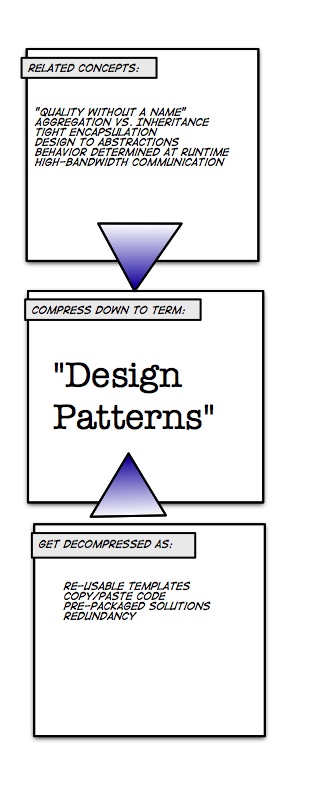
Another decompression artifact example: Design Patterns

I just finished writing about decompression artifacts and while I still had Comic Life open, I thought I would come up with another example.

Design Patterns Decompression Artifact Example
This is largely in response to the post about design patterns on the Coding Horror blog, which seems to get design patterns wrong in the usual way.